Logistics and Dropshipping

Dropshipping — Supplier Portal

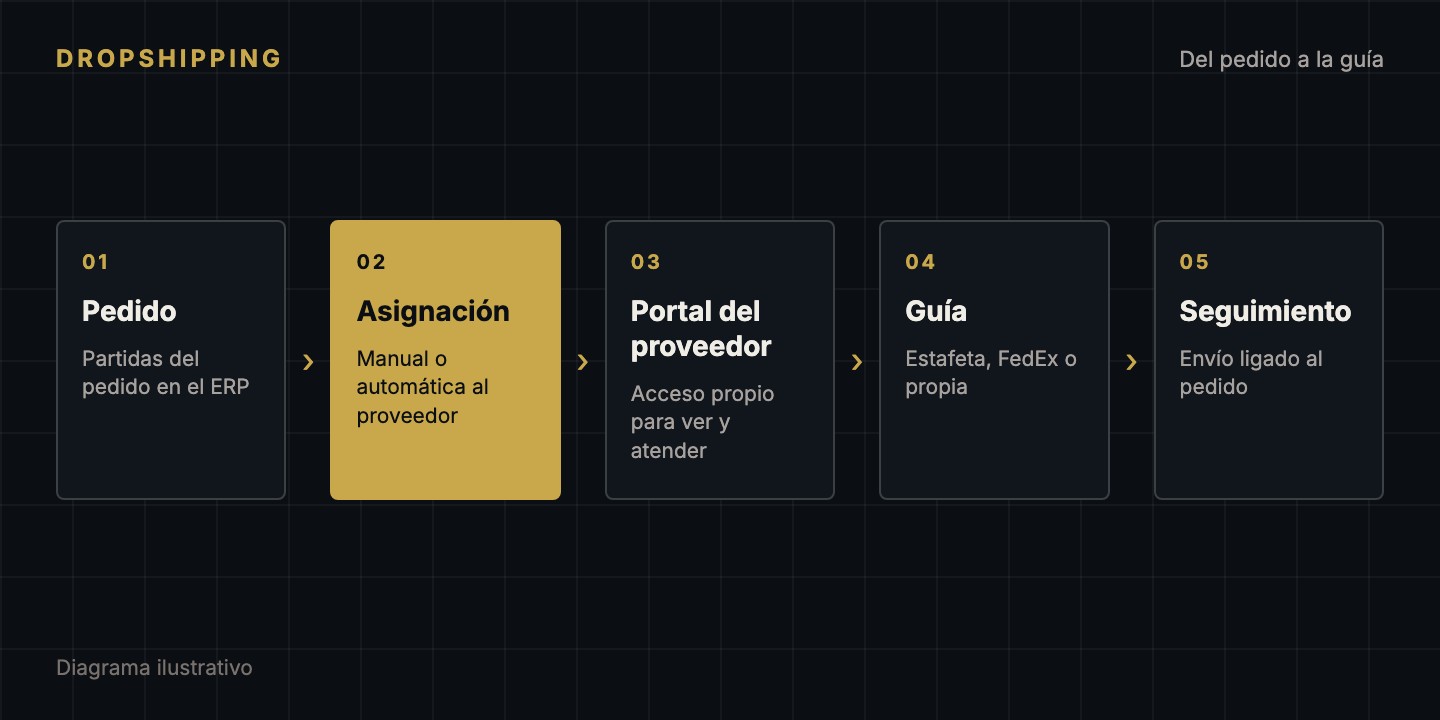
A dropshipping platform inside the ERP: orders are assigned to a supplier, who logs in to their own portal, fulfills, records the tracking number (Estafeta, FedEx or their own) and the system notifies the customer and closes the purchase without touching inventory.

2Integrated carriers, or the supplier’s own tracking
AutoAutomatic item assignment
Dropshipping — Supplier Portal
  • Supplier portal with its own access, separate from the ERP: each supplier sees only their own orders
  • Assignment of order items to a supplier, manual or automatic, suggesting the supplier that already holds the part or has an open purchase order
  • Fulfillment note in PDF with the delivery details, and tracking-label download when the shipment goes out on a carrier label
  • The supplier marks the shipment and records the tracking number (Estafeta, FedEx or their own): the order moves to shipped and the customer is notified
  • Cancellation by the supplier with a reason (out of stock, not found, different part) and an alert to the team; the parts go back to purchasing
  • Protection against duplicate purchasing: an item assigned to dropshipping is left out of the purchasing cut-off
  • Billing details per company on every order, dedicated permission and role, and an activity log for the portal
  • Node.js
  • TypeScript
  • Express
  • Prisma
  • MySQL
  • React
  • Vite
  • Tailwind CSS
  • JWT

What it solves

When a part is not in the warehouse, the order can be fulfilled directly from the supplier to the customer. The platform turns that process into a controlled flow: the team assigns the items, the supplier handles them from their portal and the ERP finds out on its own when the shipment leaves.

How it works

The team assigns an order's items to a supplier from the ERP, or the system does it automatically when the order's tracking label is generated: if an item has an open shortage purchase order, it goes to the supplier of that order, as long as they have active portal access. For manual assignment, the system suggests the supplier that already has the part on an open order or, failing that, whoever has it in stock at the lowest cost.

The supplier logs in to their portal, sees the order with its fulfillment note and, when shipping, records the tracking number and the carrier. The ERP copies the tracking number to the order, moves it to shipped, notifies the customer and closes the purchase order as delivered direct, without adding inventory, once every item is covered.

Controls

  • The portal uses a different session from the ERP: the ERP rejects portal tokens and the portal checks on every request that the user is still active.
  • A supplier cannot see or open another supplier's orders.
  • To avoid duplicate purchases, only items from orders that already have a tracking label and whose purchase order has not been sent yet are assigned; the automatic purchasing cut-off can hold eligible items for a few hours so the supplier can fulfill them.
  • If the supplier cancels with a reason, the team gets a notification and the items go back into the purchasing flow.

Carriers

The ERP generates labels with Estafeta and FedEx. In dropshipping the supplier can use those labels or record their own.
The same process on every project

01

Discovery

We map goals, users and constraints before writing code.

02

Design

Architecture and screens agreed with you before building.

03

Development

Iterative deliveries you can review along the way.

04

Deployment

Launch to production with a rollback plan.

05

Support

Monitoring, fixes and evolution after launch.

Let's talk about your project.

Tell us what you need and we will reply with a clear plan.